|
Tools, Equipment, and Materials Provided:
|
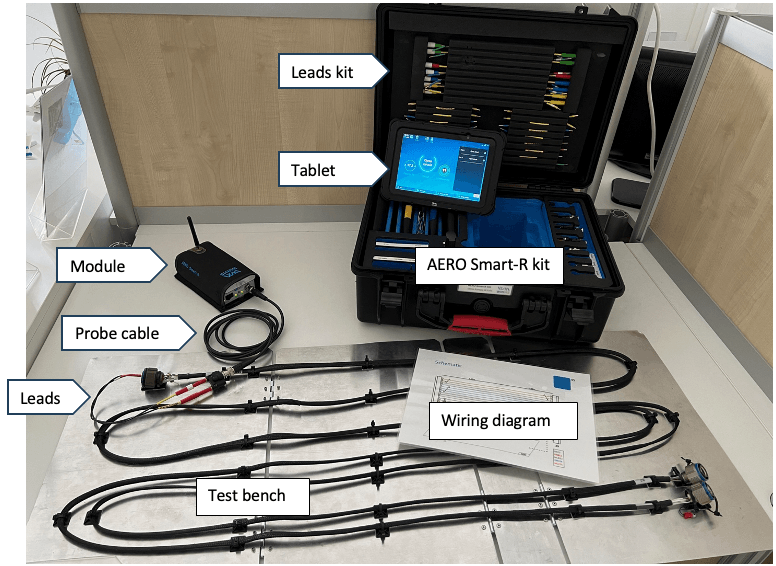
AERO Smart-R kit, including :
- AERO Smart-R kit module
- Tablet with Digital-R app
- Leads set to properly connect to the wire to test
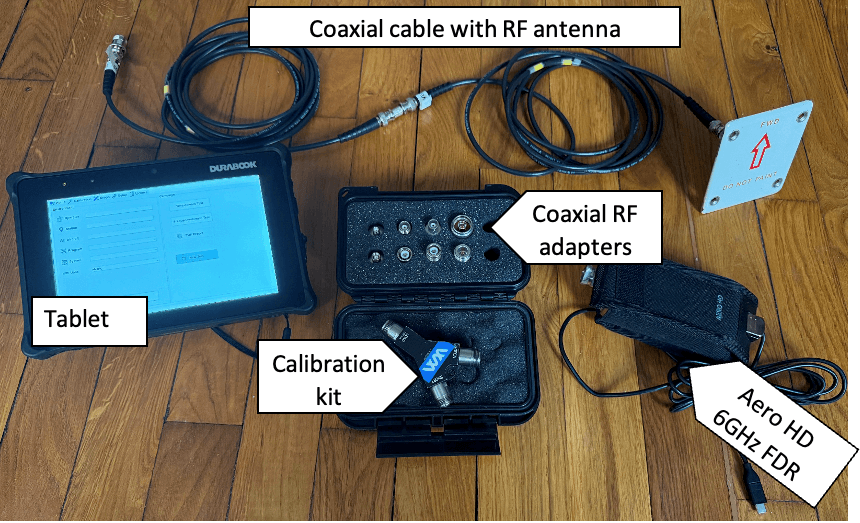
AERO HD kit, including :
- Aero HD 6 GHz FDR module
- RF adapters
- Calibration kit
- Tablet with software
Test bench & wiring diagram
Snap-on provided tooling (qty one in each of two pallets unless otherwise indicated): None
|
|
Procedures:
|
-
-
- Get familiar with the wiring diagram
- The judge will indicate which wire to inspect (different scenarios with the same level of difficulty will be given to the competitors)
- Switch on the equipment
- Switch on AERO Smart-R kit module
- Switch on the tablet (the tablet will be on sleep mode)
- Launch Digital-R app
- Select the right cable type in the cable library
- Launch a measurement on the app: Wireless connection / Permanent mode
- Connect AERO Smart-R kit to the harness on the test bench
- Select the proper leads in AERO Smart-R kit to connect to the connector
- Assemble leads with the proper Banana-BNC transition and connect to AERO Smart-R kit module using a probe cable (50 ohm BNC)
- Make sure the leads are twisted together
- Perform the diagnostics
- Read the diagnostics on the tablet
- Give the answer to the judge, should your answer is good judge will stop the clock and your time will be registered. Then a bonus exercise could be performed
- Bonus exercise
- The judge will indicate another wire (coaxial cable ) to test with AERO HD kit.
- Leave Digital-R app.
- Connect Aero HD 6GHz FDR module to the tablet with USB.
- Enter your name, location, and Aircraft Tail number.
- In Program, Select “DTF Ranges”.
- In System, Select “10 meters”.
- Then click on “ DTF – VSWR” to launch the measurement.
- Perform the tool calibration by following the procedure on the screen. Use the calibration kit.
- Select the right RF adapters to connect to the coaxial cable under test.
- Find and give exact location of the fault(s) on the coaxial cable, and locate the antenna.
- Give the answer to the judge, should your answer is good judge will validate the bonus.
- Properly switch off and store the two equipments.
|